Can AI Design Your Trade Show Exhibit? What it gets right & wrong
introduction
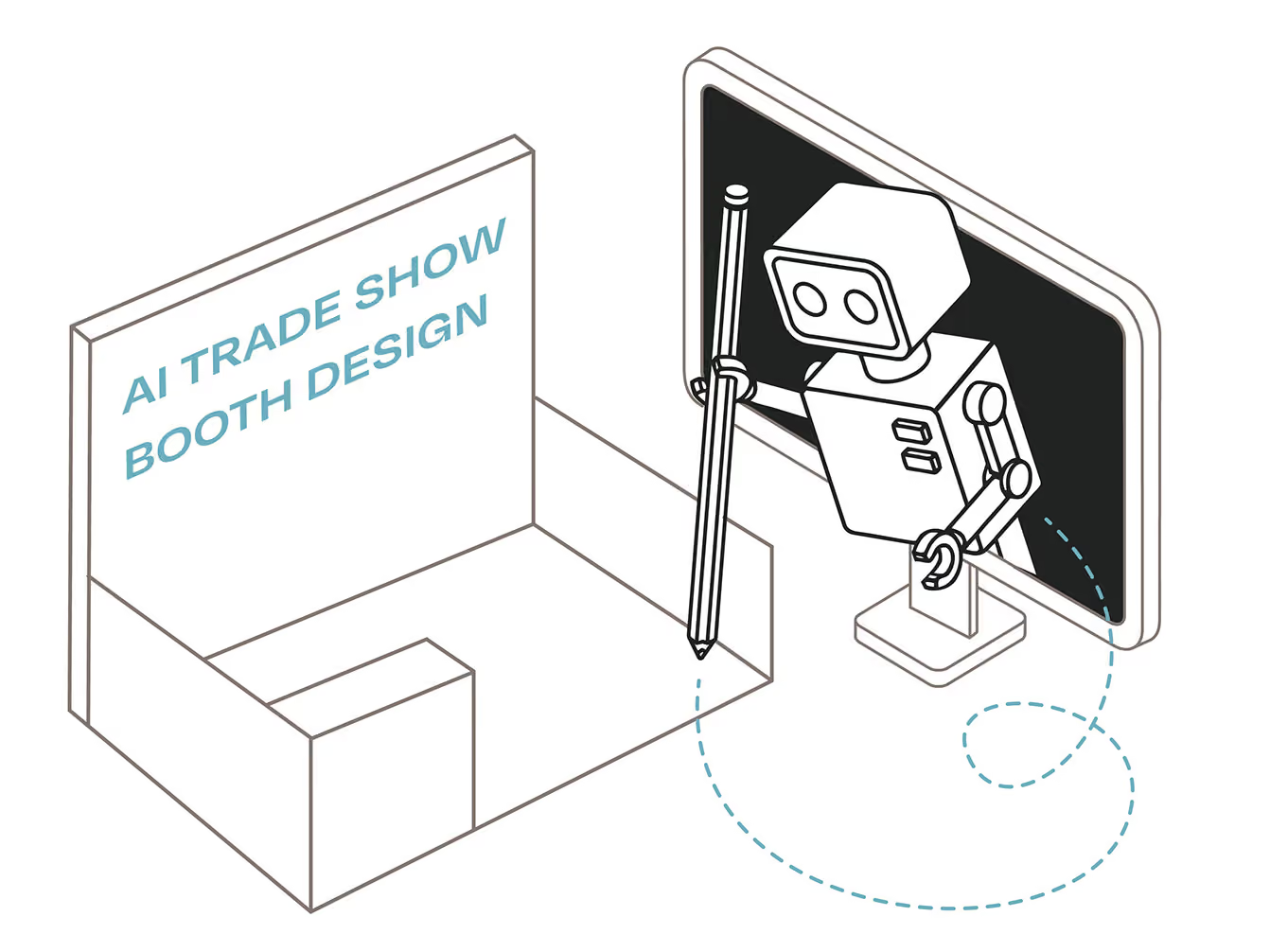
AI can generate a trade show design rendering in seconds. It can't tell you why that booth wouldn't meet the event's build code, why it blows the build and shipping budget, or why the layout wouldn't support your exhibitor strategy.
Over the past year, we’ve noticed an influx of clients using AI to share concepts, graphics, and other assets. We’ll walk through the pros and cons of using everyday AI agents for your exhibit project, what you’ll need to avoid altogether, and how to get better results with your prompts.
problems to consider when designing with AI
You're busy. You need solutions. You decide to save time using ChatGPT to design your exhibit graphics. You email your designer to "just turn the image into print graphics" and they silently weep at their desk. You don't like making designers sad, so you read on to learn some crucial limitations when designing with AI.
anything goes with AI-generated design
The sky’s the limit for what ideas AI will come up with — which is a problem. While you can certainly generate some grand layouts, graphics, and overall concepts, generic prompts in Claude or ChatGPT don’t account for industry-specific constraints and regulations. That means it hasn’t fully considered measurements, materials, sight lines, or the capabilities of modular frames and hardware. It doesn’t account for weight, how everything needs to fit into a standard crate, or whether a two-person crew can set it up within a limited installation window.
Even though that 10x10 portable display idea might look really impressive, it might actually be a custom design that costs more than you think. Without detailed instructions and context, AI can go off the rails with ideas that don't account for real trade show exhibit requirements.
originality & brand reputation
If everyone is using the same generic prompts to design their exhibits, what makes you stand out from the competition? Text, images, and the overall design starts to lose originality, and lack impact on the show floor. I see it all the time at trade shows and events — icons that look the same, imagery and posters that are all in the same design style, and sloppy design mistakes (how did that person end up with a third arm?). Bad design costs you money if qualified leads walk right past your booth because it doesn’t convey trust, professionalism, and originality.
AI-designed graphics are not print ready
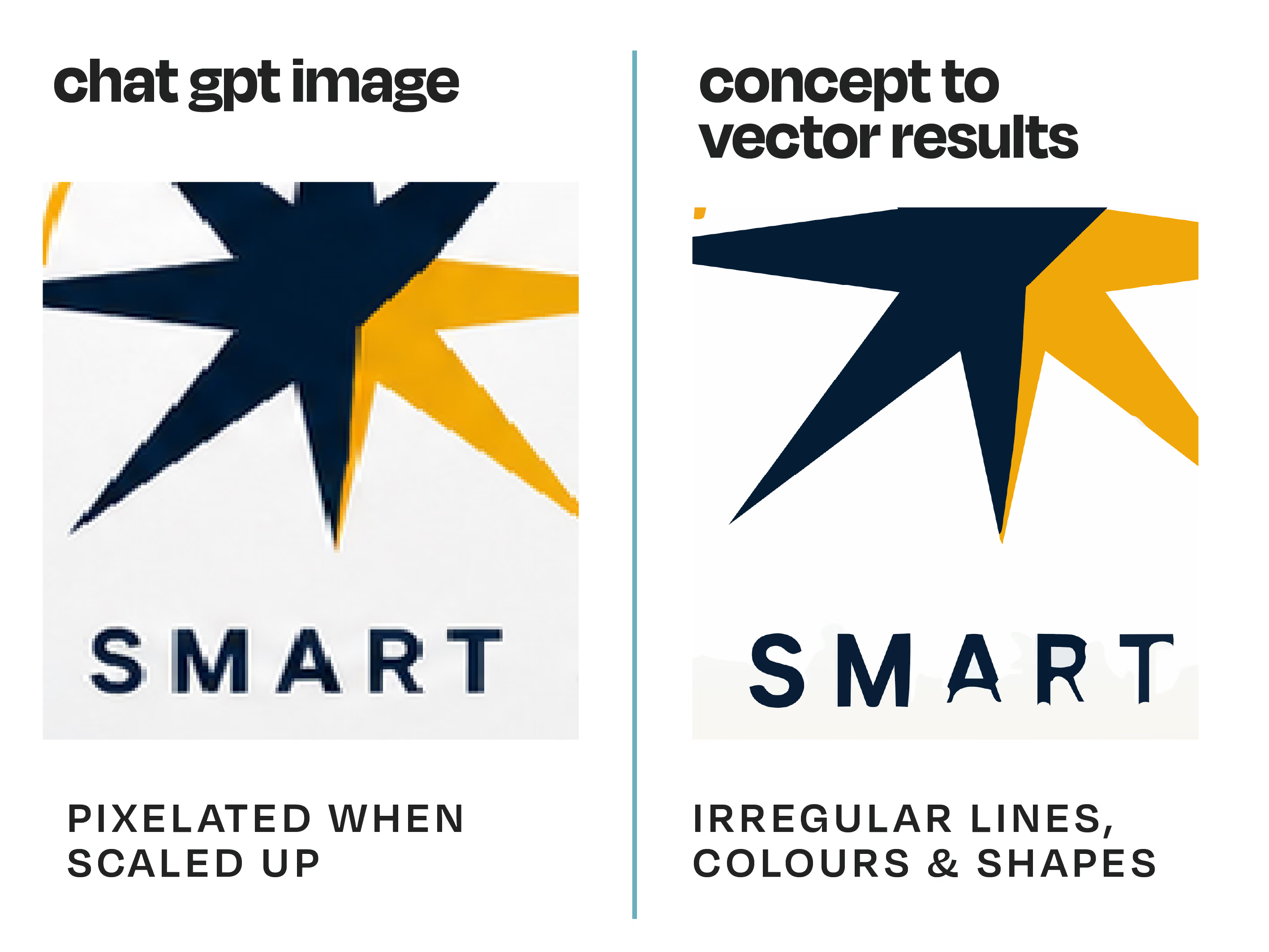
Crucial to know before you make Claude or ChatGPT your graphic designer: a photo of your graphics (JPEG, PNG) won’t work for print, no matter how nice it looks on screen. JPEG and PNG files are lossy, meaning that scaling them up to your actual exhibit size costs you resolution and quality. Images created with AI don't instantly convert into vector graphics files either. In order to do this, the image essentially needs to be traced in vector software (like Adobe Illustrator). Your image turns into a collection of shapes and lines (called paths) so that everything becomes scalable without losing detail.
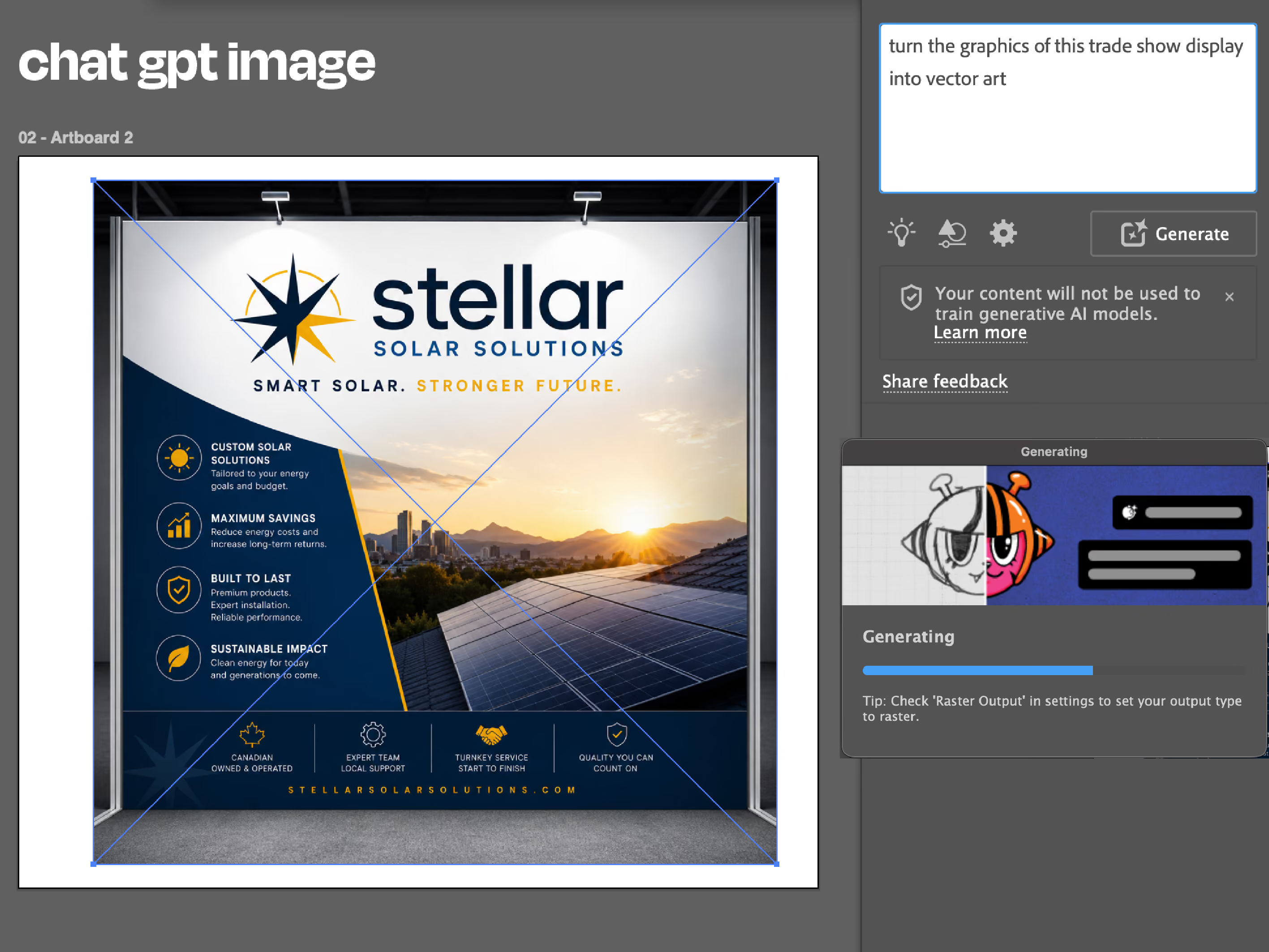
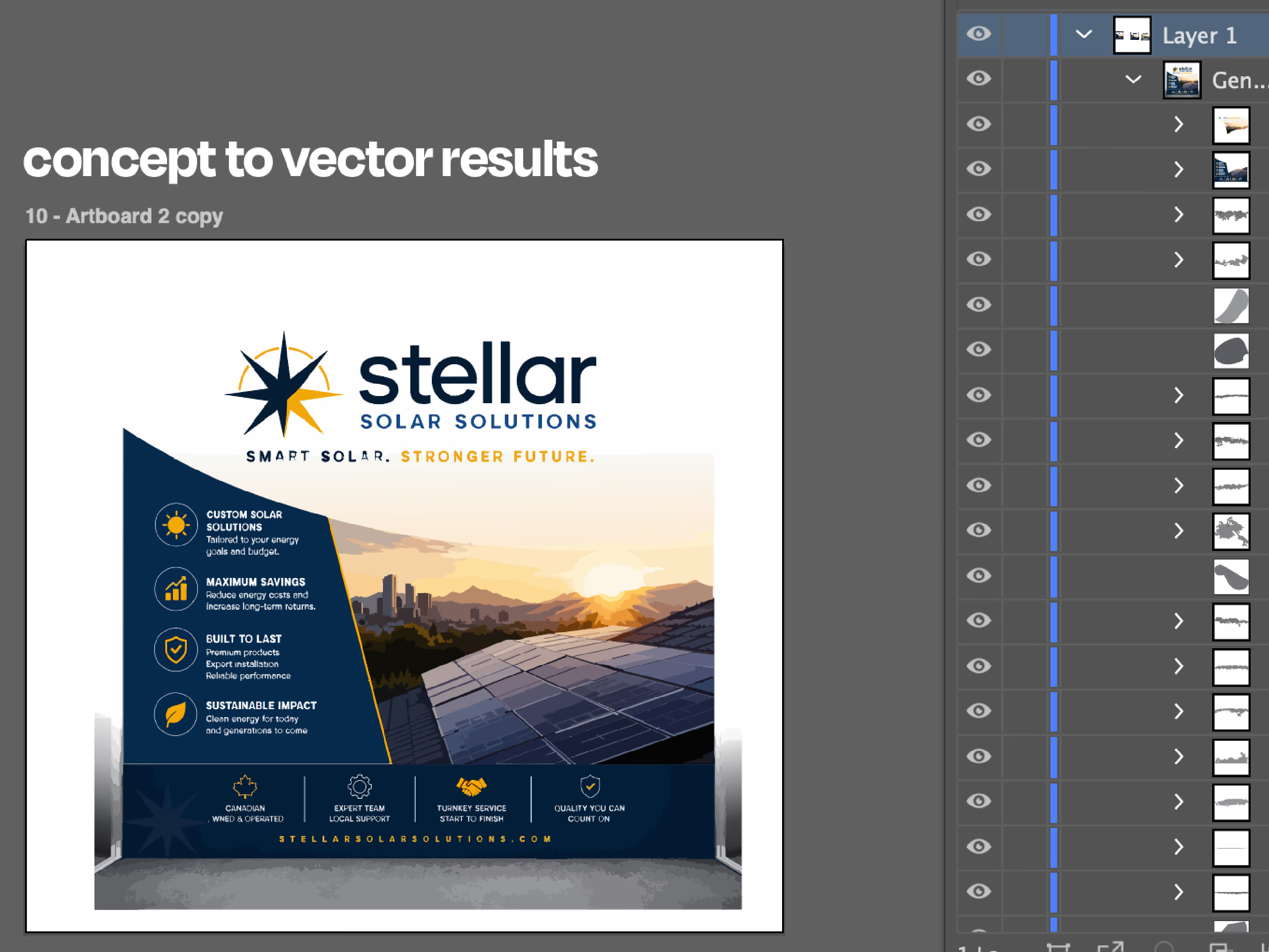
There are image trace features in vector software that can attempt to do this with the click of a button, but oftentimes manual adjustments are needed. It can work well enough for simple graphics, but quickly gets complicated if you have intricate designs, gradients, varying opacities, or realistic photo-like images. While we can turn those images into print-ready files — it’s not necessarily quick or easy. In some cases it takes less time to create an original design than it does to turn your AI-generated graphics into vector files.
It’s also worth noting that submissions for large format print need to be the highest quality possible in a CMYK colour space (digital screens use RGB). Printing also requires about four times the resolution density than an image on a screen. Screen/RGB files typically have 72 pixels per inch. To get a smooth, high-quality printed graphics, print files need to be set up in a file that is 300 data points per inch.
how you can leverage AI for your exhibit design
With the right prompts and putting some time into training your model, AI can be a helpful tool to assist you with your exhibit project. Here's what it can be helpful for with your next exhibit project.
AI-assisted research
AI can be a powerful research assistant for shows and events related to your industry, competitor insights, and exhibit display options. Before you start designing anything, it’s important to know your event-specific target audience, exhibitor options, and what your competitors have been doing.
compiling project information for briefs
When you’re first figuring out where to start, AI can help organize information and identify gaps. You can compile inspiration images/mood boards, technical documents, exhibitor goals and requirements to create a project brief. This will help when you’re choosing a design direction, and it will also create better results if you’re using AI to generate images.
early concept visualization
We completely understand that not everyone is an artist or graphic designer. When you’re first coming up with ideas to share with your team or exhibit production partner, you might not always have unlimited time to refine your concepts. With the right prompts — which we’ll share next — AI image generation can help establish better early concept visualizations.
Keep in mind those renderings will still need a professional’s eye. Your account manager needs to confirm your exhibit goals are being met, and that the concept is actually feasible when it comes to costs, scale, materials, installation, delivery, and other logistics.
better AI prompts to include for early concept visualization
We’re not advocating for AI replacing human creativity, expertise, and services. However, if you’re looking to use AI to turn your ideas into a rough visual concept for exhibit design, knowing its limitations and using the right prompts makes a difference.
If you type in “generate a 10x20 trade show exhibit design ideas for my solar energy company,” you’re not going to get great results. AI relies on context — the more specific you get, you’re more likely to get better results.
A great way to get started is by using our free self-guided design exploration worksheet, and uploading the completed document as part of your AI prompt.
a quick word about privacy before you get started
To get better results, you need to give better information. That means sharing information about your company. You should consider what AI agent and model you're using, and look into how information is used. Do you want everything you're sharing and doing to be used to train AI models? It's always important to look into how AI uses your information with privacy policies, and any additional policies your company might have on using AI for work.
1. tell your AI agent who to be, and what you're trying to do
"You are a [role] at [company]. You are coming up with [project type] ideas for [event or event type]."
Example: You are the Events Marketing Specialist at Steller Solar Solutions Inc. You are coming up with trade show booth layout ideas for multiple trade show events across Western Canada.
2. describe your ideal display type, and booth configuration
- Specify whether you want a portable, modular, custom, or hybrid design
- Specify your trade show booth size and configuration
Example: We want a modular 10x20 linear booth that scales down to 10x10, with the ability to reconfigure to a corner or split island booth space.
3. your trade show goals
- What are your goals: generate qualified leads, increase visibility, generate sales orders at the show, etc.
- Your build and design budget
- What you want to improve with this exhibit (cutting shipping costs, improve your image, feature a new product, etc.)
4. brand & culture context
- What does your company do? What makes it unique compared to your competitors?
- What are you going for when it comes to the overall look and feel (modern, sophisticated, friendly, hi-tech, etc.)
- What are your corporate colours and design elements that need to be included?
- What colours or design elements do you want to avoid?
5. audience: who you're speaking to & how they engage
- Who is your target audience and how would you describe them?
- Where should your visitors go first within your exhibit and why? What happens in this priority zone?
- What selling and demonstration tools do you use at trade shows to interact with your audience?
6. products & services
- What products and services do you want to feature?
- How much counter space, shelving, or other display space is required for products?
7. features you want in your exhibit
- Media
- Reception, work areas, meeting spaces
- Storage
- Product displays
- Flooring types (carpet, laminate or specialty flooring, etc.)
- Other accessories or features
8. graphics & messaging
- What’s the most important piece of information you want visitors to take away from your booth?
- Do you have a slogan or theme you want to incorporate?
- Graphics type (permanent, interchangeable, fabric, backlit, rigid panels etc.)
9. structural, code, & accessibility compliance
- Accessibility requirements (like ADA compliance)
- General location or show-specific requirements (ex: North American trade show exhibitor regulations)
- Installation time
- Shipping requirements
I hear you, that's a lot. You do have to put some time into drafting a good prompt, but the more specific you can get, the better. If you’re not sure on some of those points above, that’s okay — you can note what areas you’re uncertain about in your prompt, or just start with what you know.
testing out AI image-generation prompts for exhibit concepts
Using the ChatGPT image generation feature, I tested out different types of prompts to see what results I would get. For your own prompts, you could also add additional contextual documents (such as brand guidelines or a project brief) depending on how much you're comfortable sharing with your AI agent.
For the purpose of this test, I am going to be a solar company looking to reduce shipping costs with a scalable modular exhibit and a $20,000 build budget.
test 1: generic AI prompt
“Generate a 10x20 trade show exhibit rendering for my commercial solar panel company."
the result
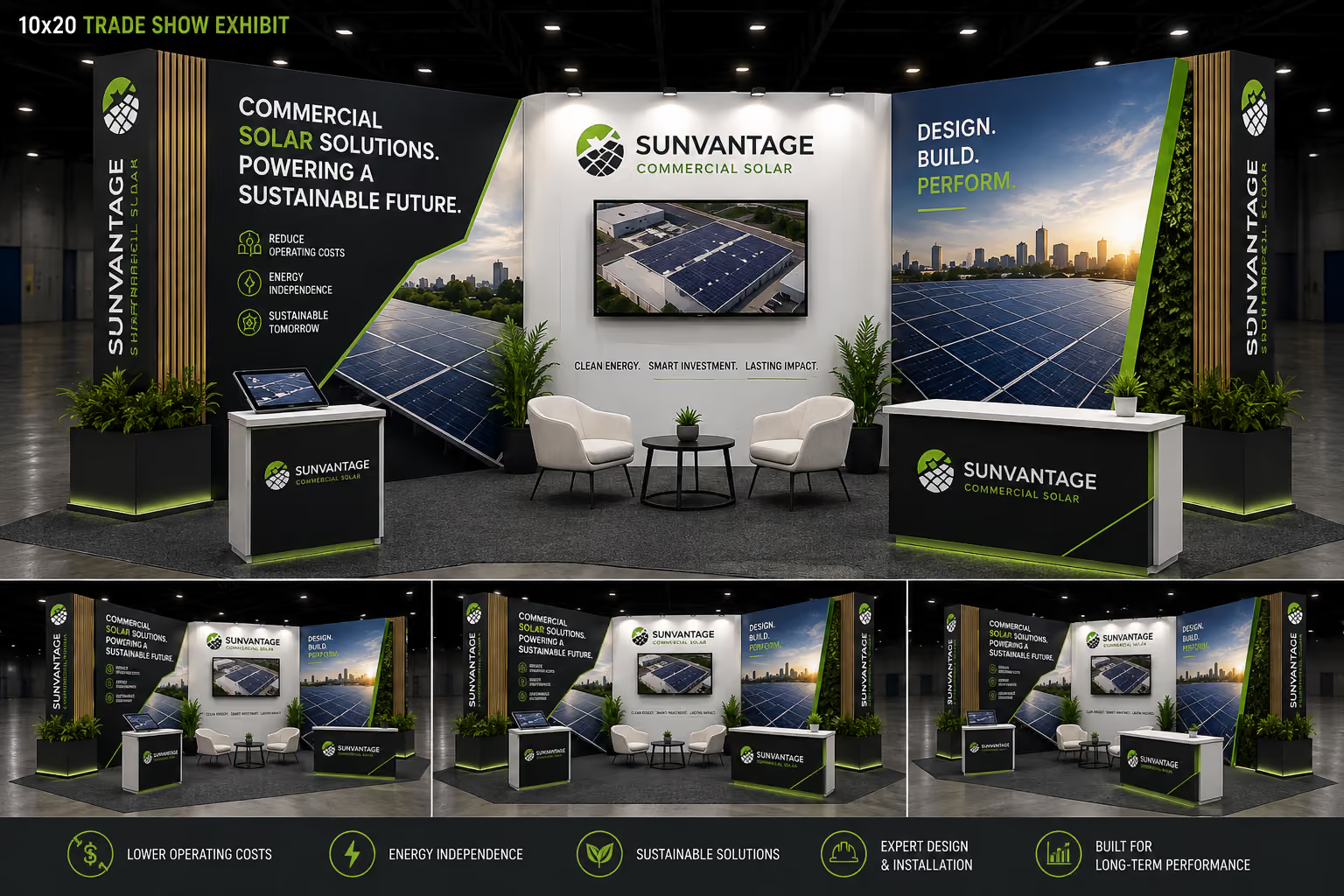
This might not look half bad at first glance, but you can tell the imagery and messaging are very generic. The wooden accents, custom counters with LED lighting, and plant boxes creep into custom build territory, which can chip away at your budget fast. The walls look like they extend past the 8-foot-tall height allowance for an in-line booth, which limits your options if you’re looking for a scalable solution. If reducing shipping costs is your goal, the weight of the custom counters, planters, and custom accents won’t get you there.
test 2: more detailed AI prompt
"You are the Events Marketing Specialist at Steller Solar Solutions Inc. You are coming up with trade show booth layout ideas for multiple trade show events across Western Canada.
You have a $20,000 design and build budget for a modular display, with some custom elements like 3D signage. The structure should be made from industry-standard aluminum extrusion frames, with rigid graphics panels or fabric for the material.
The booth needs to follow ADA compliance and general Canadian trade show regulations, and everything needs to pack into a standard 8-foot crate for shipping. The first show we're designing for is a 10x20 linear booth at the BuildX show in Calgary. It needs to scale down to 10x10, with the ability to reconfigure to a corner or split island booth space at any size. It needs to be simple for our internal team of two to set up, in four hours or less on the show floor.
I'm not sure about the graphics yet, just create options for the layout and overall booth design. We need a reception space, with some storage and additional seating for a meeting area. We want a backlit logo or 3D letters. We don't want carpet. Our key differentiator is our commitment to service excellence, backed by commercial warranties and a team of experts who support our clients' goals during and after the project. This includes four free seasonal maintenance checks and performance audits for one year after installation. That should be the main takeaway for visitors.”
the result
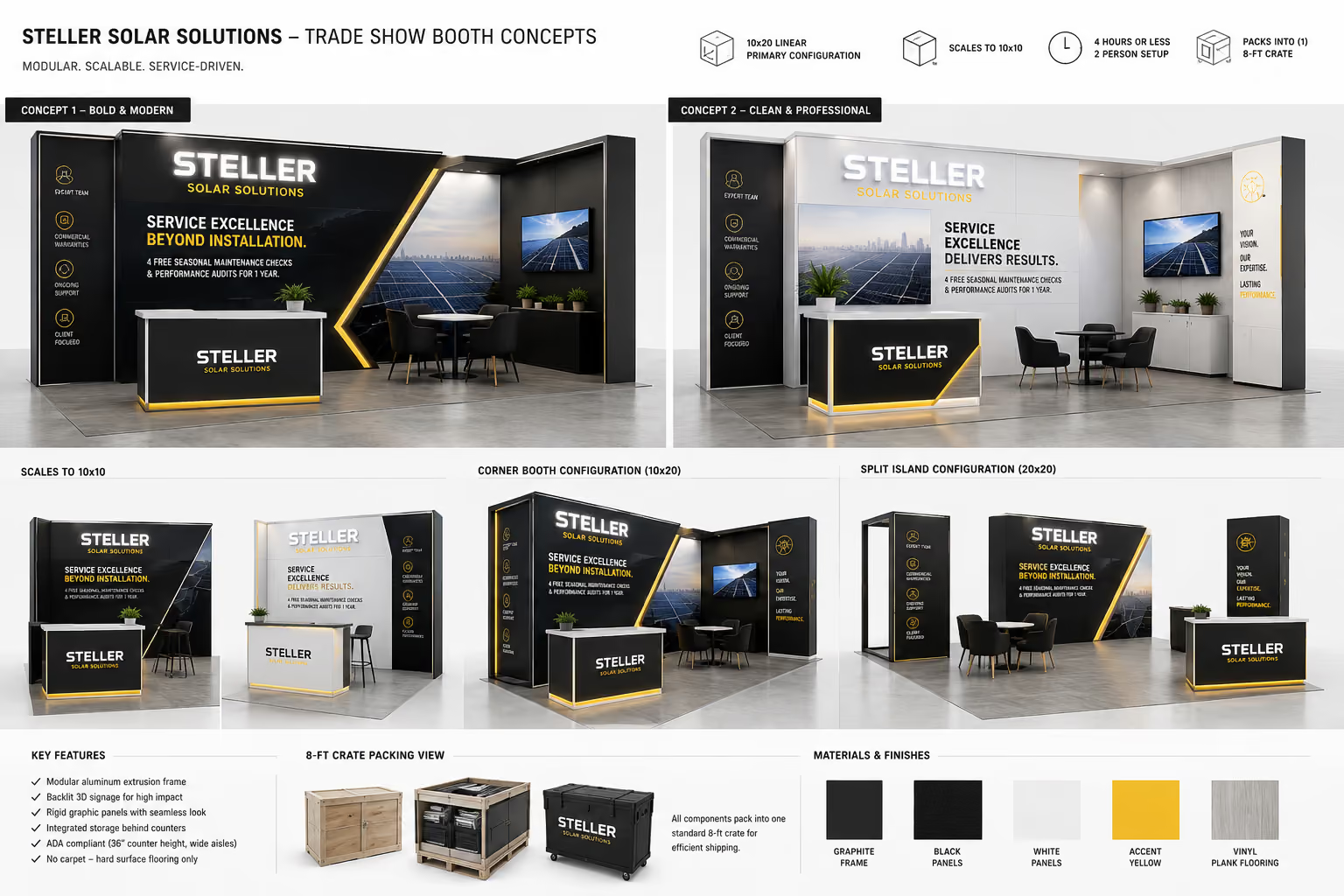
This gives you a better result than the first prompt. The height and frames are more properly scaled, and the design can be reconfigured to different sizes and booth types. The counter looks like a modular piece, which still looks polished without the extra bulk, weight, and cost of a custom build. Notice how the text and infographics still share the same look as the image from the first prompt: beware the ChatGPT special! This looks more in line with what a $20,000 budget could realistically get you.
test 3: the most detailed AI prompt
“You are the Events Marketing Specialist at Steller Solar Solutions Inc. You are coming up with trade show booth layout ideas for multiple trade show events across Western Canada. Your goal is to increase brand awareness and generate qualified leads.
You have a $20,000 design and build budget for a modular display, with some custom elements like 3D signage. The structure should be made from industry-standard aluminum extrusion frames, with rigid graphics panels or fabric for the material. It needs to be a 10x20 linear booth, with the ability to scale down to 10x10 for corner and split island configurations at both sizes.
We want to highlight our commercial solar solutions and services. Our company designs and installs reliable commercial solar systems across Western Canada with end-to-end delivery. Our key differentiator is our commitment to service excellence, backed by commercial warranties and a team of experts. We support our clients goals during and after their project with 4 free seasonal maintenance checks and a performance audit one year after installation.
We want to create a confident, hi-tech, and friendly overall look and feel for our exhibit. Our corporate colours are Pantone 14-460 blue, Pantone 11-4201 cream, and Pantone 17-5800. We use Trade Gothic for our font, and want to avoid the use of red or teal.
Our audience is relationship-oriented, team-based decision makers and executive-level decision makers focused on ROI, long-term investment, and practical benefits.
We want our target audience to approach a reception area to initiate a conversation where we can outline our process and guarantees. We use iPads, tv monitors, and hand-out brochures with case studies.
We want to feature our end-to-end process, and highlight our key differentiators that focus on ongoing support. We don’t need to showcase any physical products, but would like some shelving or storage for hand-outs, and for staff items like coats and bags.
We want tv monitors, a backlit logo or 3D letters, a reception counter with the potential for additional casual meeting space. We want fabric wall graphics or rigid panels. We don’t want carpet for our display, we want something modern and sleek for flooring.”
We want visitors to walk away knowing that we’re confident in our offerings and building relationships by offering free ongoing yearly maintenance, with a free audit that shows ROI and opportunities for the future.
We want to feature our company name and our slogan “Commercial solutions backed by real data and service.”
the result
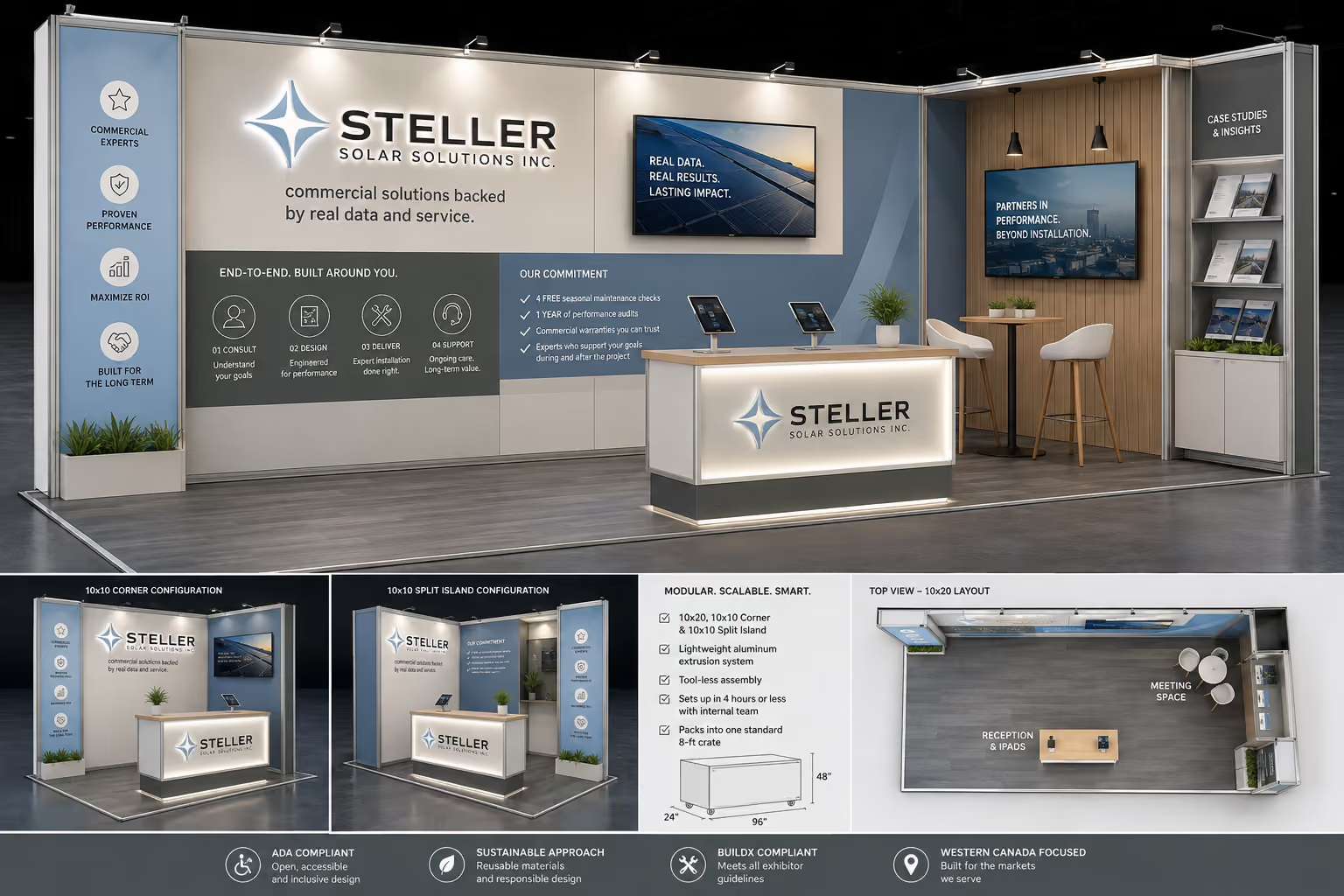
This prompt lands closer on branding, including colours, messaging, and visitor flow. The counter, lighting, wooden accents, and backlit signage all touch on custom fabrication once again, which might push the budget. The font was considered, but the infographics are still generic. The graphics panels are also a little text-heavy, and key differentiator messaging with “our commitment” would likely end up hidden behind staff at the reception counter.
This certainly isn’t perfect with graphics that are print-ready, nor is it a design that’s ready to hit the shop floor. But it is an improvement from the first generic prompt, and gives a better starting point to discuss with your team and exhibit builder.
other notes on using AI prompts for exhibit image-generation
A few factors will affect your results:
- How you structure your prompts
- How much context you give it (including text, reference documents like a project brief, brand guidelines or inspiration images)
- What AI agent you’re using and what model it is running
If you’re not getting the results you’re expecting, try restructuring your request, add additional context, or switching to a higher-tier model to generate iterations.
frequently asked questions about using AI for exhibit design
can AI agents create print-ready trade show graphics?
No (at least for now). AI image generators with Claude or ChatGPT produce raster files (JPEG, PNG) which lose quality when scaled up for large-format print. Exhibit graphics need to be scalable vector files, which require a designer to manually trace or rebuild the artwork. If you’re incorporating images into your graphics, they need to be set up for high-resolution scaling.
what kind of file formats do i need to print exhibit graphics?
Vector formats such as EPS, built in software like Adobe Illustrator. These scale to any size without losing quality. You can review other requirements here.
can AI design a full trade show booth on its own?
Not reliably. AI-generated concepts often miss real-world constraints like size allowances, crate dimensions, weight limits, and installation time. They’ll need a professional’s review and input to make sure you’re hitting your objectives in the best way possible, before becoming buildable.
final thoughts
We're not here to shame you for using AI as a starting point to communicate your vision. Not everyone is a designer, and AI can be a helpful tool to visualize your ideas. Treat it as a starting off point for concept development, not the final design.
Without providing detailed context or training the model, everyday AI agents like ChatGPT or Claude will churn out generic options that won’t factor in your audience, branding, cost considerations, event and shipping logistics, and regulations. So while it might look exciting, the actual feasibility might not match your resources, exhibitor needs, or goals. It also won’t be a print-ready or build-ready file format, and will need professional oversight and refinement.
Knowing that AI-generated renderings and graphics aren’t ready-to-go options, you can reflect critically on the results you get, and approach your exhibit builder with a clearer sense of what to expect. We can develop those concepts into real, buildable executions that factor in every detail: from shipping, to installation, and show presence — which all requires human expertise and creativity to connect with your audience.
Sign up for more insights like this!

Let’s talk ideas